Blog

sha256: 2b87a252a3d912530dd8c20df6bee7f6cbc4ede0074fdf217e318aab39d9736c

Poetry Packages

Let’s play with Packages and Libraries

References

Switch to Root Folder

cd /some/path/you/want

Create a new Package

poetry new mypackage

add some libraries

poetry add requests

… add some code …

cat << 'EOF' > mypackage/__init__.py
print("importing", __name__)
EOF

cat << 'EOF' > mypackage/main.py
print("importing", __name__)

def test1():
  print("test1")

def test2(name: str):
  print("hello", name)

def test3(name: str, age:int):
  print(f"Hello {name} at age {age}")

if __name__ == "__main__":
  print("This is a Library or Package. You should import it into your Code and not run it directly ...")
EOF

Build Package

poetry build

List Tree

(mypackage-py3.11) stoege@host:~/git/demo/mypackage> tree
.
├── README.md
├── dist
│   ├── mypackage-0.1.0-py3-none-any.whl
│   └── mypackage-0.1.0.tar.gz
├── mypackage
│   ├── __init__.py
│   └── main.py
├── poetry.lock
├── pyproject.toml
└── tests
    └── __init__.py

4 directories, 8 files

you have a package called “mypackage-0.1.0” created. As ’tar.gz and ‘.whl’ File

Hugo Table

How to add a Table to Hugo

Create Table Shortcode

cat <<'EOF'> layouts/shortcodes/table.html    
{{ $htmlTable := .Inner | markdownify }} {{ $class := .Get 0 }} {{ $old := "<table>" }}
{{ $new := printf "<table class=\"%s\">" $class }} {{ $htmlTable :=
  replace $htmlTable $old $new }} {{ $htmlTable | safeHTML }}
</table>
EOF

Build Table

add this to your Markdown File …

| a | b | c |
| - | - | - |
| bli | bla | blu |
| green | blue | red |

Result

a b c
bli bla blu
green blue red

Align Left

| a | b | c |
| :- | :- | :- |
| bli | bla | blu |
| green | blue | red |

Result

a b c
bli bla blu
green blue red

Align Right

| a | b | c |
| -: | -: | -: |
| bli | bla | blu |
| green | blue | red |

Result

a b c
bli bla blu
green blue red

Any Comments ?

sha256: b0f3682d811304f9d60e0eb42ce92d7f28de15d6dbc0a9c35d1ce7937b442a60

Debian behind TLS Proxy

Behind Corp Proxy

let’s assume you’re behing a Corp Proxy which enforce TLS Inspection, you don’t have the Proxy Cert and you want to Upgrade your Boxes …

… and of course, you do this in the LAB and for Research only and not your Productiv Environment!

TLS Inspection enabled

apt-get upate
W: Failed to fetch https://packages.sury.org/php/dists/bookworm/InRelease  Certificate verification failed: The certificate is NOT trusted.
The certificate issuer is unknown.  Could not handshake: Error in the certificate verification. [IP: xx.xx.xx.xx yyyy]

Disable TLS Check

touch /etc/apt/apt.conf.d/99verify-peer.conf
echo >>/etc/apt/apt.conf.d/99verify-peer.conf "Acquire { https::Verify-Peer false }"

Update

apt-get update
apt-get upgrade

Any Comments ?

sha256: 40c39ed441b4690a8644cd63bfd2e6987f06a70c4f922eca14de5dcc27d4fb35

Python TinyDB

Storing Data in JSON - TinyDB

Small Example how to Store Data in JSON, and Query them afterwards like a NOSQL DB. Have a look at TinyDB if you wanna see more.

Code

from tinydb import TinyDB, Query
from pprint import pprint

# Create or load a database file
db = TinyDB('db.json')

# insert some sample data
def insert():
    # Insert data
    db.insert({'name': 'John', 'age': 30})
    db.insert({'name': 'Alice', 'age': 25, 'hobbies': 'sleep'})
    db.insert({'name': 'Max', 'age': 20, 'hobbies': ['sleep', 'play', 'eat']})

# show all entries
def show_all():
    all_records = db.all()
    pprint(all_records)

# entries with hobbies
def show_entries_with_hobbies():
    User = Query()
    result = db.search(User.hobbies.exists())
    pprint(result)

# entries without hobbies
def show_entries_without_hobbies():
    User = Query()
    result = db.search(~User.hobbies.exists())
    pprint(result)

# show entries with hobbies and older than 22 years
def show_entries_with_hobbies_and_older_than_22():
    User = Query()
    result =  db.search((User.hobbies.exists()) & (User.age > 22))
    pprint(result)

if __name__ == "__main__":
  # Add
  insert()

  # show
  print("\n-- ALL --")
  show_all()

  print("\n-- with Hobbies --")
  show_entries_with_hobbies()

  print("\n-- without Hobbies --")
  show_entries_without_hobbies()


  print("\n-- with Hobbies and older than 22 --")
  show_entries_with_hobbies_and_older_than_22()

Run

you need to install tinydb. use a virtual env like .venv, poetry or whatever you like

Fastapi Project Template

Project Template for FastAPI

gave a try with a FastAPI Template, https://github.com/rochacbruno/fastapi-project-template.git

Projectname: gugus1234

clone the repo

git clone https://github.com/rochacbruno/fastapi-project-template.git gugus1234
cd gugus1234

Switch Poetry

i’d like to have poetry as virtual env manager

make switch-to-poetry

Rename some Stuff

had to rename some string in pyproject and different files …

mv project_name gugug1234
gsed -i 's/a-flask-test/gugus1234/' pyproject.toml
gsed -i 's/project_name/gugus1234/' pyproject.toml
gsed -i 's/project_name/gugus1234/g' gugus1234/cli.py gugus1234/app.py gugus1234/config.py gugus1234/security.py

Run Poetry once

poetry shell
poetry lock
poetry install

Admin User

let’s create admin user

Fastapi Simple Security

How to Protect your App with Simple Security

Let’s build a small API Endpoint with FastAPI and protect it with SimpleSecurity.

API key based security package for FastAPI, focused on simplicity of use:

  • Full functionality out of the box, no configuration required
  • API key security with local sqlite backend, working with both header and query parameters
  • Default 15 days deprecation for generated API keys
  • Key creation, revocation, renewing, and usage logs handled through administrator endpoints
  • No dependencies, only requiring FastAPI and the python standard library

Build new App

and show the Directory Structure

Restricted Shell

Restricting User to Script

Let’s assume you have some Users around and they should be able to run certain Scripts. These Scripts do various things, login to some systems, perform task, get data from an API, whatever you want. All these Actions needs Credentials which must be available to the script, although they are not part of the Script. They could be Provides via OS Env, .env File, Encrypted Password Store or whatever. But if the Script is able to access these Credentials, a logged in User would could access it also.

SSH LogLevels

Log Levels for SSH

In SSH, the LogLevel option allows you to control the level of logging information generated by the SSH client and server.
There are several log levels you can use to adjust the verbosity of SSH logging. Here are the most commonly used log levels:

QUIET:
Suppresses all log messages, except for fatal errors. It provides the least amount of information.
FATAL:
Logs only fatal errors, indicating severe issues that may prevent the SSH session from being established.
ERROR:
Logs error messages, which are issues that might cause problems but don't necessarily prevent the session from being established.
INFO:
Logs informational messages, such as connection status and key exchange details. This is the default log level.
VERBOSE:
Provides more detailed logging than INFO, including additional debugging information.
DEBUG:
Generates detailed debugging messages. This level is useful when diagnosing connection and authentication issues.
DEBUG1, DEBUG2, DEBUG3:
Provides even more verbose debugging output, with DEBUG3 being the most detailed.

Settings per User

cat ~/.ssh/config
  Host *
    LogLevel QUIET
    LogLevel FATAL
    LogLevel ERROR
    LogLevel INFO
    LogLevel VERBOSE
    LogLevel DEBUG
    LogLevel DEBUG1
    LogLevel DEBUG2
    LogLevel DEBUG3
    ...

Any Comments ?

sha256: b62b3c4dc3fb31bf4d2cadbd8d3a632de0a9374ae4a2a6026d0b6d9d0bace367

Python Ping3

Need a Litte Ping Function ?

Test

cat <<'EOF'> ping.py
import argparse
from ping3 import ping, verbose_ping

def do_ping(host: str, timeout: int = 3, size: int = 1500, output: str = "json"):
    # output: json|txt
    # '21.54 ms'
    if size > 1500:
        size = 1500
    result = (
        str(
            round(
                ping(dest_addr=host, timeout=timeout, size=size, unit="ms"),
                2,
            )
        )
        + " ms"
    )
    if output.lower() == "json":
        return {"host": host, "timeout": timeout, "size": size, "result": result}
    if output.lower() == "txt":
        return result
    else:
        return f"output format '{output} unknown! use 'json|txt'"


def do_multiple_ping(host: str, count: int = 3, interval: float = 0):
    # ping 'www.stoege.net' ... 23ms
    # ping 'www.stoege.net' ... 24ms
    # ping 'www.stoege.net' ... 20ms
    verbose_ping(
        dest_addr=host,
        count=count,
        interval=interval,
    )


def main():
    # Create the argument parser
    parser = argparse.ArgumentParser(description="Ping a domain or IP address.")

    # Add the host argument
    parser.add_argument(
        "host",
        metavar="HOST",
        type=str,
        nargs="?",
        default="www.stoege.net",
        help="the domain or IP address to ping",
    )

    # Parse the command-line arguments
    args = parser.parse_args()

    # Call the ping function
    output = do_ping(host=args.host, output="json")

    # Print the ping output
    print(f"\n{output}\n")

    # Call the ping function. No return Value !
    do_multiple_ping(host=args.host, count=10, interval=0.1)


if __name__ == "__main__":
    main()
EOF

add module

poetry, venv, whatever you like

Python Logger

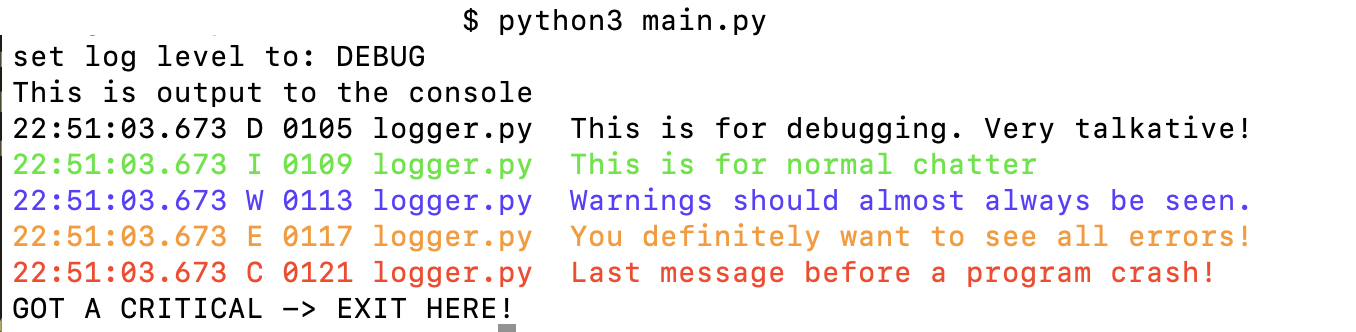
a custom logger for Python

let’s tune the default logger a bit so he write nice and colored messages.

Screenshot
config.py

a little config File …

cat <<'EOF'> config.py
LOGGER_MAX_FILE_LENGTH = 10
EOF

src/logger.py

the logger code in the ‘src’ Folder

mkdir src
cat <<'EOF'> src/logger.py
import logging
import datetime
import sys

from config import *

if isinstance(LOGGER_MAX_FILE_LENGTH, int):
    LOGGER_MAX_FILE_LENGTH = str(LOGGER_MAX_FILE_LENGTH)


def get_now() -> str:
    #
    # choose your format
    #
    current_time = datetime.datetime.now()

    # 2023-07-16 22:16:15.958
    formatted_time_1 = current_time.strftime("%Y-%m-%d %H:%M:%S.%f")[:-3]

    # 22:16:54.471
    formatted_time_2 = current_time.strftime("%H:%M:%S.%f")[:-3]

    # 22:17:21
    formatted_time_3 = current_time.strftime("%H:%M:%S")

    return formatted_time_2


class ExitOnCriticalHandler(logging.Handler):
    def emit(self, record):
        # Unset Color
        COLOR = RESET = "\033[0m"

        # Debug -> Black
        if record.levelno == logging.DEBUG:
            COLOR = "\033[0m"
        # Info -> Green
        elif record.levelno == logging.INFO:
            COLOR = "\033[92m"
        # Warn -> Blue
        elif record.levelno == logging.WARNING:
            COLOR = "\033[94m"
        # Error -> Orange
        elif record.levelno == logging.ERROR:
            COLOR = "\033[38;5;208m"
        # Critical -> Red
        elif record.levelno >= logging.CRITICAL:
            COLOR = "\033[91m"

        # Custom Line
        print(
            COLOR
            + "{:} {:} {:04} {:{w}} {:}".format(
                get_now(),
                record.levelname,
                record.lineno,
                record.filename,
                record.msg,
                w=LOGGER_MAX_FILE_LENGTH,
            )
            + RESET
        )

        # Exit on Critical
        if record.levelno >= logging.CRITICAL:
            logging.shutdown()
            print("\033[91m" + "GOT A CRITICAL -> EXIT HERE!" + "\033[0m")
            sys.exit()


# Init Logger
logger = logging.getLogger()
logger.setLevel(logging.INFO)

# Create and add the custom handler
exit_handler = ExitOnCriticalHandler()
logger.addHandler(exit_handler)


# Set Log Level
def set_log_level(level: str):
    # Parse/ Set LogLevel
    if level.lower() in ["d", "debug"]:
        logger.setLevel(logging.DEBUG)
    elif level.lower() in ["i", "info"]:
        logger.setLevel(logging.INFO)
    elif level.lower() in ["w", "warning"]:
        logger.setLevel(logging.WARNING)
    elif level.lower() in ["e", "error"]:
        logger.setLevel(logging.ERROR)
    elif level.lower() in ["c", "critical"]:
        logger.setLevel(logging.CRITICAL)

    # Custom level name mappings, Debug -> D
    logging.addLevelName(logging.DEBUG, "D")
    logging.addLevelName(logging.INFO, "I")
    logging.addLevelName(logging.WARNING, "W")
    logging.addLevelName(logging.ERROR, "E")
    logging.addLevelName(logging.CRITICAL, "C")


# Functions to Call
def ldebug(msg: str):
    logger.debug(msg)


def linfo(msg: str):
    logger.info(msg)


def lwarning(msg: str):
    logger.warning(msg)


def lerror(msg: str):
    logger.error(msg)


def lcritical(msg: str):
    logger.critical(msg)
EOF

main.py

the Main File with Argparse to set the Logging Level on Startup